
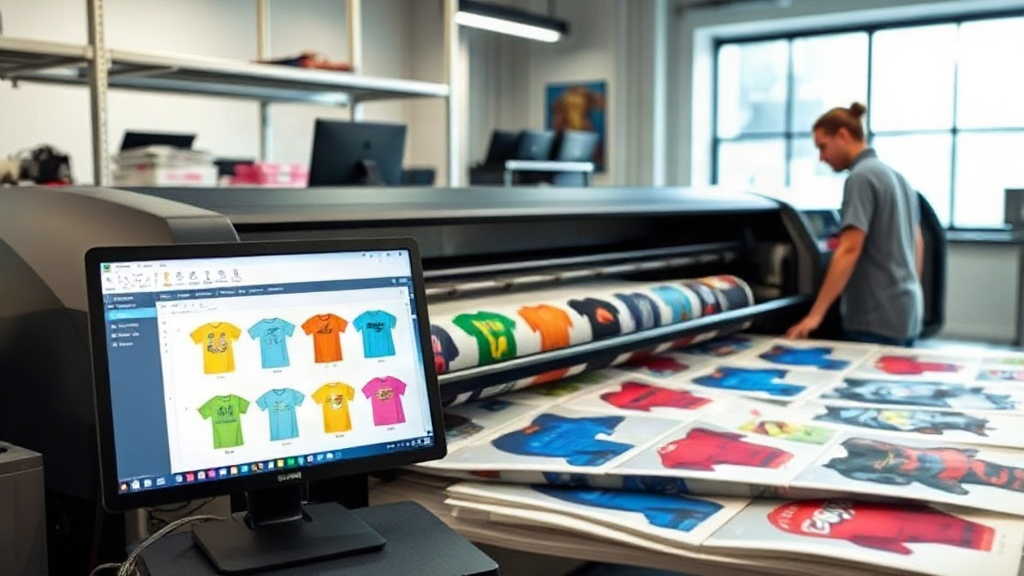
In the competitive world of custom apparel printing, efficiency and cost-effectiveness are the keys to staying profitable. If you run a print shop or a home-based business, you're likely familiar with dtf printing, which has revolutionized the way we transfer designs onto fabrics. But are you using a dtf gangsheet builder to its full potential? This tool can transform your workflow, saving you hours of manual layout and reducing material waste. Let's explore how a gangsheet builder works, why it's essential for your business, and how to make the most of it.
Before diving in, let's clarify what a gangsheet is. In DTF printing, a gangsheet is a single sheet of transfer film that contains multiple designs arranged closely together. Instead of printing each design individually, you nest them to maximize the use of the film. Manually creating a gangsheet can be tedious and error-prone, but a dtf gangsheet builder automates this process, allowing you to upload your designs, set quantities, and let the software optimize the layout. This not only saves time but also reduces waste and cuts costs. In this article, we'll cover everything you need to know about gangsheet builders, from their benefits to practical tips for getting started.
What Is a DTF Gangsheet Builder?
A dtf gangsheet builder is a software tool designed to help you arrange multiple DTF transfer designs on a single sheet efficiently. It takes your individual design files and automatically nests them to minimize empty space. This is crucial because DTF film is sold by the roll or sheet, and any unused area is wasted money. The builder ensures you get the most out of every inch.
Most gangsheet builders offer features like:
- Automatic nesting algorithms to fit designs tightly.
- Drag-and-drop interface for manual adjustments.
- Quantity settings to repeat popular designs.
- Preview and cost estimation before printing.
By using a gangsheet builder, you can produce more transfers in less time, which is especially important during peak seasons or when fulfilling large orders.
Why You Need a Gangsheet Builder for Your DTF Printing
If you're still manually laying out your DTF transfers, you're likely losing time and money. Here's why investing in a gangsheet builder is a game-changer:
Time Savings
Manually arranging designs can take hours, especially if you have dozens of different images. A gangsheet builder automates the nesting process, reducing layout time to minutes. You can then focus on printing and pressing, which are revenue-generating activities.
Cost Reduction
DTF film and ink are not cheap. By optimizing the layout, you use less film per transfer, lowering your cost per unit. Over time, these savings add up significantly. For example, if you can fit 20% more designs on a sheet, you're essentially getting 20% more output for the same material cost.
Increased Production Capacity
With faster layout and less waste, you can take on more orders without increasing your working hours. This scalability is vital for growing your business.
Consistency and Accuracy
Manual layout can lead to mistakes like overlapping designs or forgetting to include a design. A builder ensures every design is placed correctly and accounted for, reducing errors and reprints.
How to Choose the Right DTF Gangsheet Builder
Not all gangsheet builders are created equal. When selecting a tool, consider the following factors:
- Ease of Use: Look for an intuitive interface that doesn't require a steep learning curve.
- Nesting Algorithm: The more efficient the nesting, the more you save. Test with complex designs.
- Compatibility: Ensure it supports your design file formats (PNG, PDF, etc.) and integrates with your printer's software.
- Pricing: Some builders are free, while others require a subscription. Evaluate based on your volume.
- Additional Features: Some offer color management, order tracking, or even direct printing capabilities.
Many online platforms offer free trials, so you can test before committing. For small shops, a simple tool might suffice, but high-volume businesses may need advanced features like barcode scanning or automated cutting integration.
Step-by-Step: Using a DTF Gangsheet Builder
Here's a typical workflow when using a gangsheet builder:
- Upload Your Designs: Import your artwork files into the builder. Most tools allow batch upload.
- Set Quantities: Specify how many of each design you need. The builder will duplicate them as necessary.
- Choose Sheet Size: Select the dimensions of your DTF film roll or sheet.
- Auto-Nest or Manual Adjust: Let the algorithm arrange the designs, or tweak manually if needed.
- Preview and Confirm: Check the layout for any overlaps or gaps. Some builders show a cost estimate.
- Print: Once satisfied, send the file to your DTF printer.
After printing, you'll cure the ink, apply adhesive powder, and press the transfers onto garments. The gangsheet builder ensures this process starts smoothly.
Maximizing Efficiency with Your Gangsheet Builder
To get the most out of your dtf gangsheet builder, follow these best practices:
- Group Similar Sizes: Nest designs of similar dimensions together to minimize gaps.
- Use High-Resolution Files: Low-quality images may cause printing issues and waste materials.
- Plan for Common Orders: If you frequently receive orders for certain designs, create gangsheets in advance.
- Update Software Regularly: New versions often include improved algorithms for better nesting.
- Monitor Material Usage: Track how much film you use per sheet to identify further savings.
Additionally, consider combining gangsheet building with other automation tools, such as order management systems, to streamline your entire production process.
Common Mistakes to Avoid
Even with a builder, some pitfalls can reduce your efficiency:
- Overcrowding: Trying to fit too many designs can lead to cutting errors or poor print quality. Leave a small margin between designs.
- Ignoring Print Direction: Some designs have a specific orientation. Ensure they are rotated correctly.
- Forgetting Bleed: Add a little extra space around each design to allow for cutting.
- Not Testing: Always print a test sheet with new layouts to catch issues before mass production.
By avoiding these mistakes, you'll maintain high quality and minimize waste.
Frequently Asked Questions
What is a DTF gangsheet builder and how does it work?
A DTF gangsheet builder is software that arranges multiple DTF transfer designs onto a single sheet to maximize film usage. It uses nesting algorithms to automatically place designs efficiently, reducing waste and saving time.
Can I use a gangsheet builder for small orders?
Absolutely. Even for small orders, a gangsheet builder helps you use film more efficiently, which lowers your cost per transfer. It's beneficial for businesses of all sizes.
Are there free DTF gangsheet builders available?
Yes, some free tools exist, but they may have limited features. Paid versions often offer advanced nesting, better support, and additional functionalities. Evaluate based on your needs.
How do I ensure my designs are printed correctly on a gangsheet?
Always use high-resolution images, set the correct dimensions, and preview the layout before printing. Also, calibrate your printer and use quality DTF film and ink.
Can a gangsheet builder help reduce my production costs?
Definitely. By optimizing film usage, you reduce material waste and lower your cost per transfer. Over time, this leads to significant savings and higher profit margins.
Incorporating a dtf gangsheet builder into your workflow is a smart move for any DTF printer. It streamlines production, cuts costs, and allows you to scale your business efficiently. Whether you're a solo entrepreneur or running a large shop, the right tool can make a world of difference. Start exploring gangsheet builders today and experience the benefits firsthand.